- Audience
- Beginners making web materials, courseware or a personal site with AI.
- Topics
- HTML fundamentals, format decisions and working with an agent.
- Format
- Ten slide images with notes only where they add to the slide, an interactive demonstration and a recording link.
Opens in Feishu; sign-in or access permission may be required. Public playback has not been verified.
About the course
The original ten-page course explains HTML, when to choose it, how a single file becomes a website project, and how to work with an agent on materials you can inspect. Notes appear only where they add a decision or an action beyond what the slide already says.
The embedded courseware remains in Chinese.
Practical assignment
Use confirmed, publishable materials to make a first local version of your personal site: who you are, your work, your strengths and how to contact you. Finish the content and structure before deciding whether to publish.
Read at your own pace. Slides retain the original Chinese; only teaching notes that add to a slide appear below it.
Open slide demonstration01 · Why do content changes keep turning into layout work?

I first wanted to solve an everyday materials problem. A proposal, report or introduction page might need a new layout after changing one sentence, or a new crop after replacing an image. Asking AI to edit an Office file directly could also disrupt its formatting.
The cycle was familiar: new information, content edits, layout adjustments, another export, then more changes. When content and formatting are tightly coupled, even a small edit can trigger substantial work.
This course looks at a more manageable way to produce materials with AI. HTML makes the content structure and visual rules easier for an Agent to understand and change.
02 · Can you make HTML materials without knowing how to code?

I am Yuli. When I first tried AI in February, I could neither code nor build a website. I now use it to help build websites, design pages, organise content and maintain the resulting work.
You can learn a new way of producing materials before becoming a programmer. In this course, an Agent is an AI tool that can read reference material, create files, run a page and inspect the result.
We cover three things: what an HTML page is; how to make a single-file material with an Agent; and when to move into a website project. A personal-site exercise brings the process together.
03 · What is an HTML page?

PowerPoint opens a PPT file, Word opens a Word document, and a browser opens HTML. A file named presentation.html can display a report, product introduction or personal page when opened locally.
Text, images, charts and buttons are organised into a page structure, then displayed by the browser. HTML can support courseware, proposals, reports, long pages and personal sites. A website is one application of this format.
A local file is not automatically online. Other people can access it through a public address only after it has been published. A typical page has three parts:
- HTML organises the content.
- CSS controls its appearance.
- JavaScript provides interactions.
For this introductory course, I refer to the combined result as an HTML page.
04 · How do you choose between HTML, PPT and PNG?
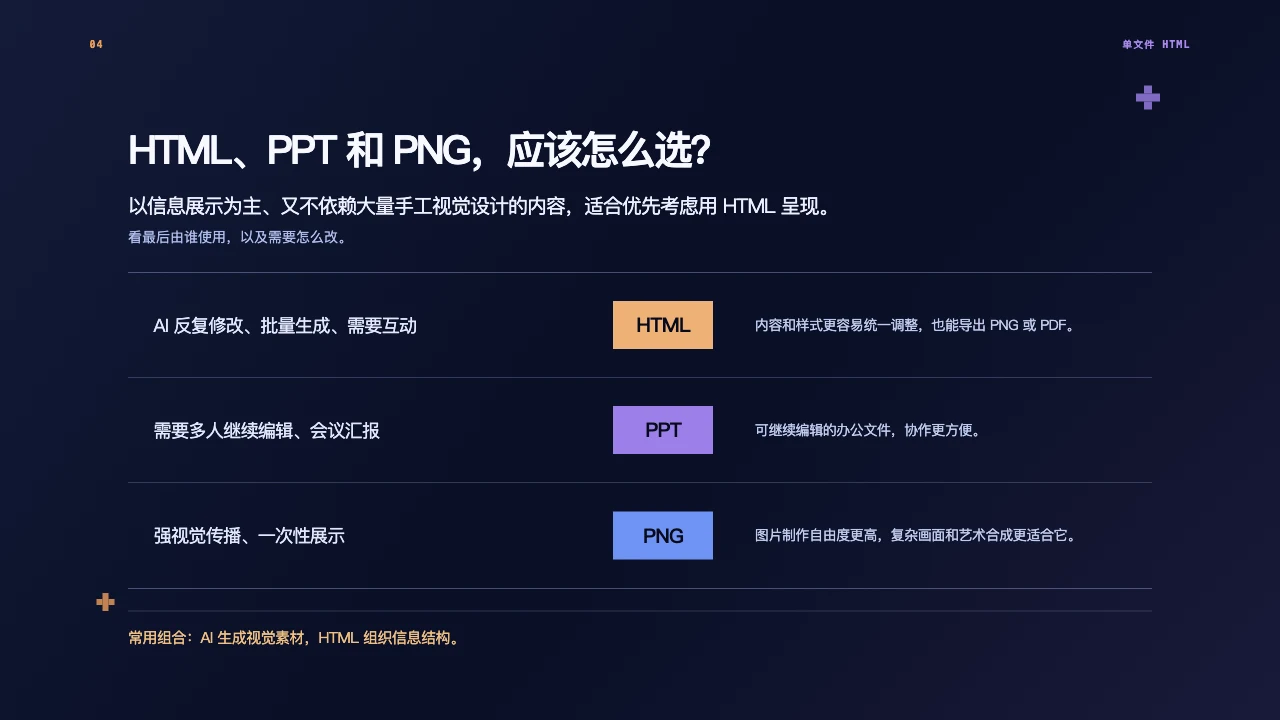
Choose for the person who will use the result and the changes they will need to make. HTML is worth considering for information-led materials that do not depend on extensive manual visual composition.
| Situation | First choice | Reason |
|---|---|---|
| Repeated AI edits, batch production or interaction | HTML | Content and styles can be adjusted together; images or PDF can also be exported |
| Further editing by colleagues or a meeting presentation | PPT | An editable office format is easier to hand over |
| Visual communication or a one-off image | PNG | Suits posters, social posts, event graphics and complex compositions |
PNG belongs in the comparison because many users are not designers. Some images that once required specialist design tools can now be generated with AI and used directly.
The formats can work together: AI generates a visual, HTML organises the information, while a presentation that colleagues must continue editing stays in PPT.
05 · How do you brief an Agent for a single-file HTML material?

“Make me a premium-looking page” is not enough. The Agent needs the audience, the problem and the deliverable. A usable brief covers five steps:
- Set the goal. Who is reading, and what should they understand or do?
- Choose the format. A long page, 16:9 deck, A4 document or 4:3 poster: pick a primary format rather than mixing proportions.
- Organise the inputs. Which material can be used, which facts cannot be invented, and how should gaps be marked?
- Define the appearance and modules. Set colours, fonts, tone and references; specify text, images, charts and any interaction.
- Generate and inspect. Open the result in a browser, give concrete feedback, then export.
For example, a product introduction for overseas buyers might aim to explain the product’s advantages and encourage an enquiry. Define that goal before choosing the page format, visual references and modules.
After generation, check the facts, images, overflow, and both phone and desktop layouts. Continue revising where necessary.
People judge the direction; AI helps execute and iterate. Generate, inspect, revise and generate again is the working process, not a single prompt.
06 · When is one HTML file no longer enough?

A single file is useful for one-off materials, simple displays and infrequently changing content. Consider a project structure when the file becomes difficult to navigate, edit or reuse. Three signals matter:
- More content: multiple pages, navigation, media organisation or shared modules that need consistent updates.
- More functionality: forms, search, filters, sign-in, stored data or third-party services.
- Longer maintenance: regular updates, collaboration, version control or automated releases.
Page count alone does not decide it. A simple personal introduction need not become a complex engineering project. A company site with products, cases and a regularly updated blog is a stronger candidate. Even one page can justify separation when its functions or data become complicated.
07 · What is a website project?
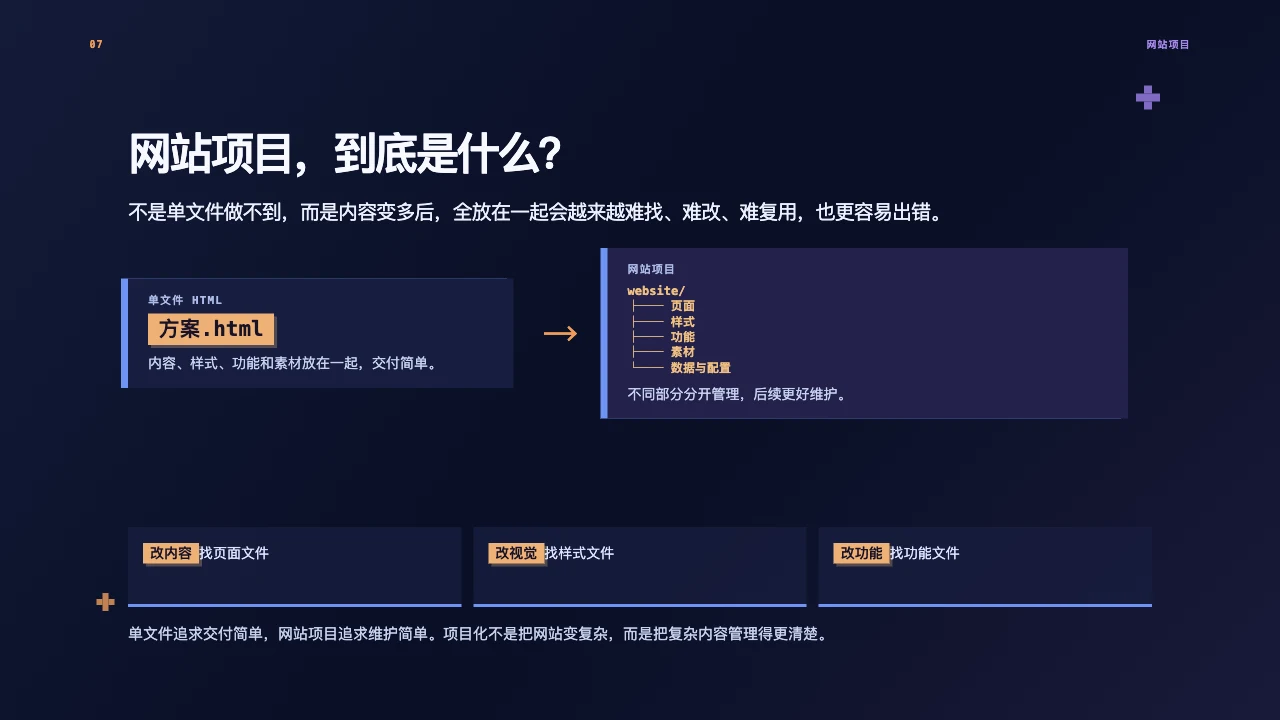
A single file holds content, styles, functions and assets together for straightforward delivery. A project separates those responsibilities:
website/
├── pages
├── styles
├── functions
├── media
└── data-and-configuration
Pages determine what is shown; styles determine its appearance; functions handle interactions; assets hold images, fonts and related resources.
To change copy, find the page. To change appearance, find the styles. To change an interaction, find its implementation. Separation reduces unintended interference, but related behaviour still needs checking.
The purpose is to organise complexity so that ongoing maintenance and upgrades become easier.
08 · How do you work with an Agent on a website project?

Explain the website goal, content structure, visual rules and development environment before execution. Better results depend on the information prepared beforehand.
- Goal: Who is the site for, why do they visit, and what should they be able to do?
- Content: Organise brand, product, image, case and copy inputs; plan the pages and hierarchy without filling factual gaps by invention.
- Visual rules: Provide the identity system, references or design. Build one representative page before expanding.
- Environment: Have the Agent inspect the project directory and instructions, explain dependencies and their impact, and install only within the confirmed scope. Ask for local start-up instructions. Git can record changes, but overwriting, deleting, committing and publishing require clear authorisation.
- Checks: Complete the essential pages and user paths; inspect images, buttons, links and layouts in a browser.
A personal site is a useful first exercise. Its business logic and data can remain simple while it still involves positioning, content, visuals, page structure and a publishing decision. Start with confirmed, non-sensitive information and decide about deployment after checking the first version.
09 · How can other people see the page?
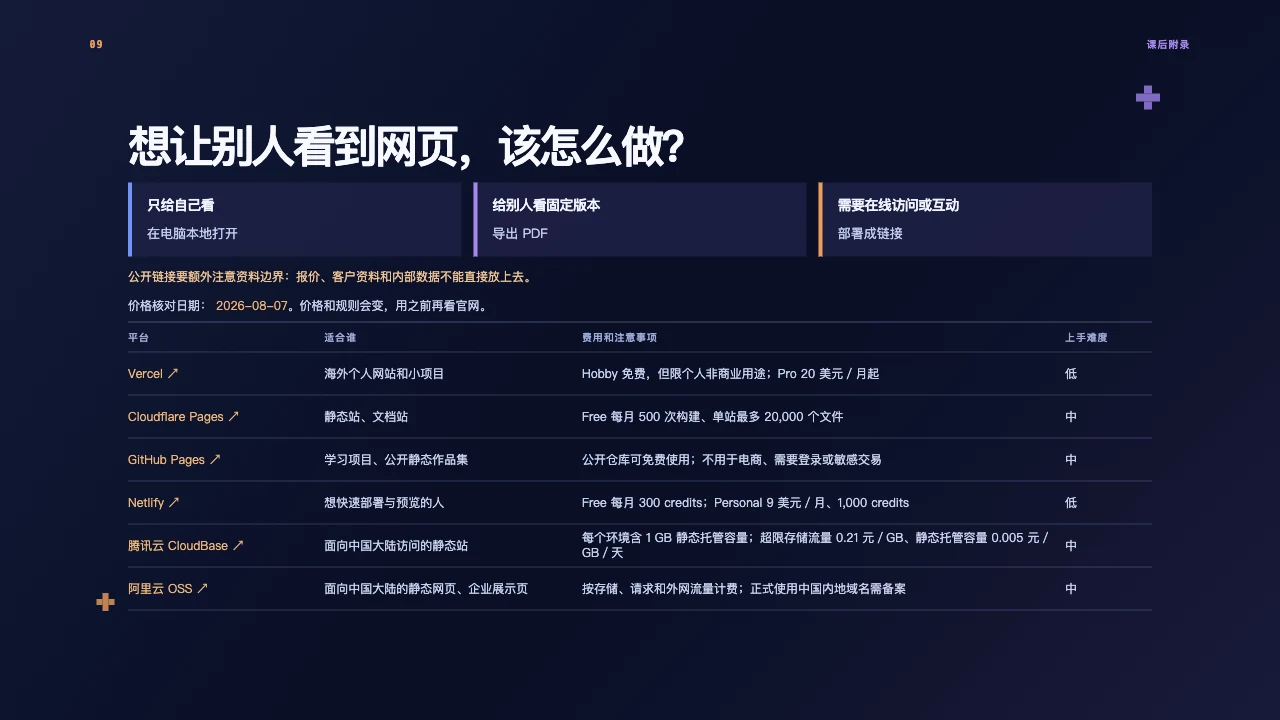
Start with the delivery need. Open it locally for personal use; export a PDF for a fixed version; deploy it when online access or interaction is required.
Choose a platform based on the audience’s location, commercial use, forms or backend needs, domain setup and compliance. The slides compare Vercel, Cloudflare Pages, GitHub Pages, Netlify, Tencent CloudBase and Alibaba Cloud OSS.
The prices and limits shown in the slide are course references dated 7 August 2026, not current quotations. Check each provider’s current prices, commercial terms, allowances, domain and filing requirements before use. Historical sources can also use different pricing definitions; do not purchase from this comparison alone.
Before making a link public, check again for quotations, customer information, internal data and credentials. Working locally does not mean a page is ready for public release.
10 · Practice: make your first personal site

Use AI to build a first local version with three parts:
- Introduction: Who are you, and what experience do you bring?
- Capabilities and projects: What can you do, what have you done, and what is cleared for public use?
- Contact: How can someone reach you?
The exercise takes you through content organisation, page design, HTML production and project management. Check the information, navigation, images and phone layout before deciding to publish.
The same approach can extend to company sites and product pages: clarify the goal, organise usable inputs, let AI assist with execution, then inspect the result yourself.